 StoreEdit AI
Solo
1 shop
regular price: €297now: €97
per year
- Every kind of change
- Unlimited products and requests
- Preview, approval, undo, history
- Updates for a year
StoreEdit AI Pro lets your own AI assistant bulk edit your WooCommerce products: prices, stock, categories, attributes, titles, descriptions, SEO fields. You see every product, now and after, in WordPress. You approve. You can undo.
No API keys · No AI credits · Your own Claude or ChatGPT · Undo any change
Your supplier raises prices on four hundred products. Or the new season needs a tag. Or half the catalogue has no meta description.
So you open WooCommerce and start.
Bulk edit changes whatever you ticked, one screen of products at a time, and has no undo. A CSV export fixes that until the spreadsheet drops the leading zeros from your SKUs and you import the file anyway.
Or you hand the shop to an AI tool that writes straight into it. It is fast. You find out what it changed when a customer does.
Speed was never the problem. Not seeing the change before it is live is the problem.
And then there is no way back except last night’s backup, which also takes today’s orders with it.
I run an agency that looks after WooCommerce shops. I wanted the AI to do the reading and the thinking, and I did not want it holding the pen. So I built the plugin that way.
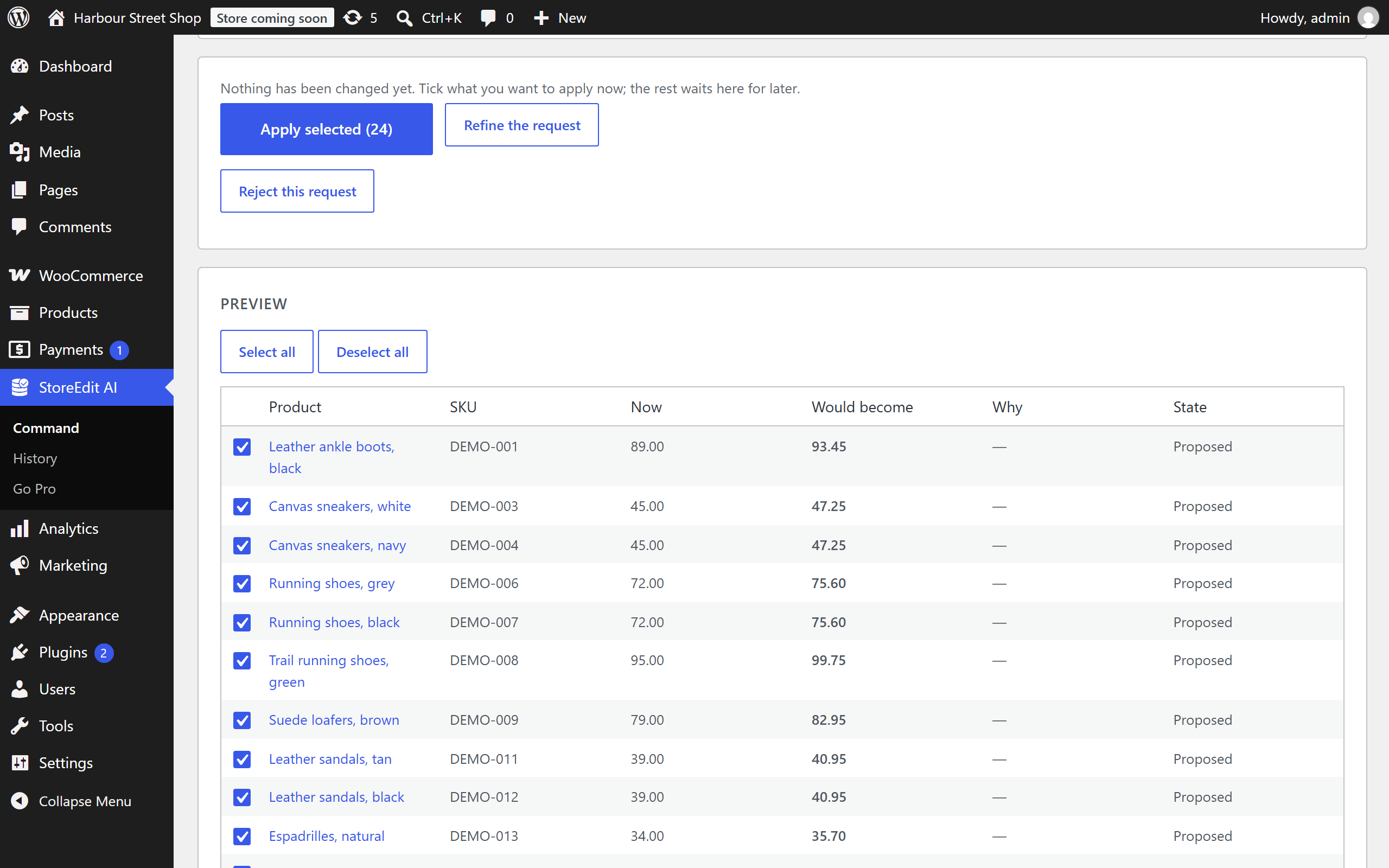
Your assistant prepares the change. WordPress shows you every product, with its value now and the value it would get. The shop changes only when you press Apply, and every change can be put back exactly.
There is no AI inside the plugin and nothing to pay per use. It works with the Claude or ChatGPT account you already have, through a sign-in that lets the assistant read products and propose. It cannot approve anything.
In Claude or ChatGPT, in any language: “Raise the regular price of all shoes by 5%, except the ones on sale.” The assistant reads your catalogue and prepares the change.
WordPress shows what you asked, how it was understood, and each product with its value now and after. Anything the assistant was unsure about comes unticked. Untick whatever else you like.
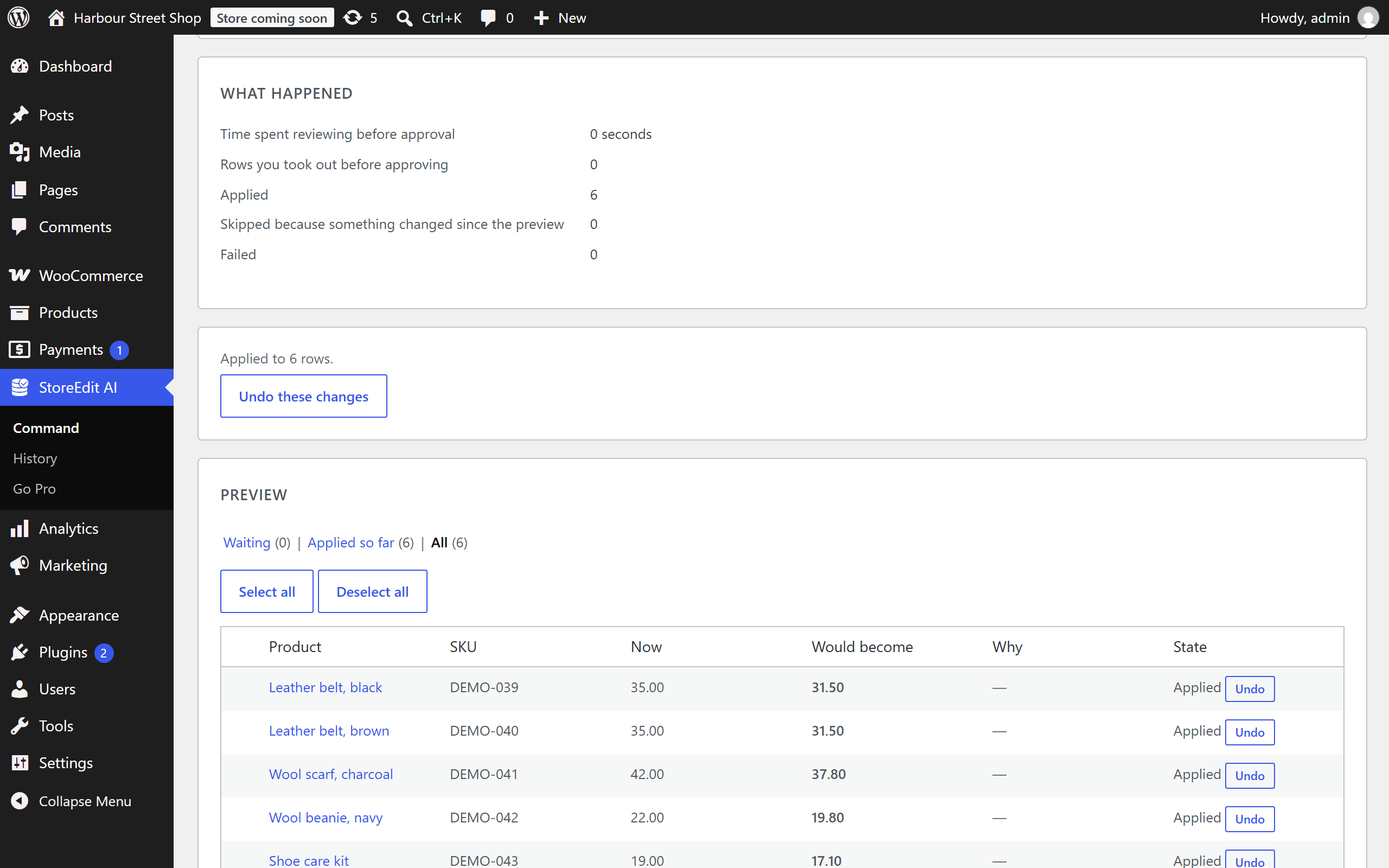
Each row is checked again as it is written. A product that changed in the meantime is skipped, and you are told. Undo one product or the whole request, days later.
Some changes need the assistant to read each product one by one. Others follow a filter. All of them go through the same preview, the same approval and the same undo.
Find which products are blue and set Colour.
Find the products in the wrong category and move them.
Write clean titles for the glasses.
Write a short description wherever one is missing.
Write an SEO title for the glasses.
Write a meta description wherever one is missing.
Make the product addresses short and readable.
Raise the regular price of all shoes by 5%, except the ones on sale.
Put all bags on sale at 20% off until the end of October.
Set every product in Clearance to out of stock.
Add all accessories to the Gifts category as well.
Publish the drafts tagged spring.
Every product gets its own text, not the same one for all. Titles, descriptions, SEO fields and slugs: up to 1,000 products per request, as many requests as you like. Examples are illustrative.
Our own measurements on a test shop, October 2026. Large requests are applied in the background, in batches, so the browser can be closed.
| StoreEdit AI Pro | WooCommerce bulk edit | CSV export and import | An AI tool that writes directly | |
|---|---|---|---|---|
| You ask in plain words | Yes | No | No | Yes |
| You see every product before it changes | Yes, row by row | No | Only in the spreadsheet | Depends on the tool |
| A different text for each product | Yes, written by your assistant | No | You write each one | Yes |
| Undo | One product or the whole request | No | Import an older file | Depends on the tool |
| A record of who approved what | Yes | No | No | Depends on the tool |
| Thousands of products | In the background | One screen at a time | Yes | Depends on the tool |
Every plan has every kind of change and updates while the licence is active. The plans differ only in how many shops you run. Prices are without VAT.
1 shop
regular price: €297now: €97
per year
3 shops
regular price: €497now: €197
per year
Unlimited shops
regular price: €997now: €497
per year
If you do not renew. Prices, stock, categories and tags keep being written. The other changes become previews again. Your history stays, and undo for everything already written keeps working.
No. The plugin contains no AI model and asks for no API key. You use your own assistant, with the account you already have there. The yearly licence is the only thing you pay us.
Claude and ChatGPT. They connect to your shop with a secure sign-in (OAuth) that you approve inside WordPress and can revoke at any time.
No. It can read products and propose a change. Applying needs the approval of a person who can manage the shop, in WordPress. The assistant cannot approve, apply or undo.
Products only: names, texts, prices, stock, categories, tags and attributes. It does not see customers, orders or payments. It reads a product’s text as data, never as an instruction.
Yes, if it is Yoast SEO, Rank Math, SEOPress or The SEO Framework. The SEO title and the meta description are written into that plugin’s own fields, one text per product, and undo puts back what was there. All in One SEO is not supported yet.
It is not written. Every row is checked again at the moment it is applied, and any row that is no longer as you saw it is left alone and listed as skipped.
Every plan has unlimited products. On our test shop, one request with 12,596 changes was written in 28 minutes in the background and undone in 20, with every value as it was.
Prices, stock, categories and tags keep being written. The other changes become previews again. Your history stays, and undo for everything already written keeps working.
WordPress 7.0 or later, PHP 8.1 or later, WooCommerce, and a shop that is online over HTTPS. With your purchase you get two plugins, StoreEdit AI and StoreEdit AI Pro, and you install both.
No. VAT is added at checkout where it applies.
Ask for the change in one sentence, see it product by product, and undo it whenever you want.